Top Tableau Interview Questions and Answers

What is Tableau?

Tableau is a data analytics and business intelligence platform which is flexible and easy to use ensuring a smooth experience to the users. The main pillars of strength for Tableau are interactive dashboards, quick responsiveness, and real-time data analysis. Also, it offers a wide range of eye-catching graphics or visualizations to represent your data set pictorially like charts and graphs.

Basically, Tableau provides all the capabilities that we require for a successful data analysis like data extraction, processing, representing/visualizing and sharing the final reports/dashboards/worksheets with others.

What are the main features of Tableau?

The reason behind Tableau gaining immense popularity in little time is its attractive set of features and functionalities. Some key features of Tableau are:

  • Drag-and-drop functionality
  • Range of native data connectors
  • Data highlights and filters
  • Share dashboards
  • Dashboard embedding
  • Mobile-ready dashboards
  • Data notifications
  • Tableau Reader (for data viewing)
  • Dashboard commenting
  • Creating “no-code” data queries
  • Queries to visualization conversions
  • Import data of all sizes
  • Creating interactive dashboards
  • Creating guided stories
  • Metadata management
  • Automatic updates
  • Security permissions at any level
  • Tableau Public for data sharing
  • Server REST API
  • ETL refresh. For more info Tableau Training

Can you explain the Tableau design flow?

The design or logic flow in Tableau is as follows:

  • Connecting to the data source through the connectors available in Tableau.
  • Create data views, that is, creating visualizations like charts, graphs, etc.
  • Enhancing the data views using advanced Tableau methods.
  • Creating different worksheets so that we can have different data views from the same or different data.
  • After worksheets, we can create dashboards that are organizing different and relevant data views in a single view for reporting.
  • Using these dashboards or workbooks we can create stories to express the language of data better.

How is the Context Filter different from other Filters?

  • Whenever we create a Context Filter, Tableau will create a temporary table for this particular Filter set and other Filters will be applied on the Context Filter data like cascade parameters.
  • Suppose, we have created a Context Filter on countries, USA and India, Tableau will create a temporary table for these two countries’ data and if we have any other Filters other will be applied on these two countries’ data if we don’t have any Context Filter, each record will check for all Filters.

What is the disadvantage of Context Filters?

  • The Context Filter is not frequently changed by the user—if the Filter is changed, the database must be recomputed and the temporary table has to be rewritten, slowing performance.
  • When we set a dimension to context, Tableau creates a temporary table that will require a reload each time the view is initiated. For Excel, Access, and text data sources, the temporary table created is in an Access table format.
  • For SQL Server, MySQL, and Oracle data sources, we must have permission to create a temporary table on our server.
  • For a multidimensional data source, or cubes, temporary tables are not created, and Context Filters defined which Filters are independent and which are dependent. Tableau Advanced Training. Learn more Tableau Advanced Training

What is aggregation and disaggregation of data?

Suppose, we have data like below:

Eid Ename Salary Dept
1.abc 2000 java
2.bbc 3000 .net
3.Krishna 2500 java
Madhu 300
5.Vamshi 3000 mainframes
1.abc 1000 testing
2.bbc 3000 tableau
3.krishna 5000.net
4.Madhu 7000 testing
vanshi 9000 tableau
1 abc 11000 Mainframes
2 bbc 13000testing
3 krishna 15000 java
4 Madhu 17000 .nte
5 vamshi 19000.net

Aggregation: To display aggregate data
Sum/avg salary by each individual employee
Drag ename on column and salary on rows, and we will get the sum (salary) of each and individual employee
Now, change the measure type as Avg

Choose salary option: choose measure types as ‘Avg’

Disaggregation: To display each and every transaction

When we look at the aggregated data in the views above, each bar represents all transactions for a specific employee summed up or averaged into a single value. Now, say, we want to see the individual salary transactions for each employee. We can create a view like that by selecting Analysis > Aggregate Measures.

What are the different Tableau Products and what is the latest version of Tableau?

Here is the Tableau Product family.

(i)Tableau Desktop:

It is a self service business analytics and data visualization that anyone can use. It translates pictures of data into optimized queries. With tableau desktop, you can directly connect to data from your data warehouse for live upto date data analysis. You can also perform queries without writing a single line of code. Import all your data into Tableau’s data engine from multiple sources & integrate altogether by combining multiple views in a interactive dashboard. Learn more skills from Tableau Server Training

(ii)Tableau Server:

It is more of an enterprise level Tableau software. You can publish dashboards with Tableau Desktop and share them throughout the organization with web-based Tableau server. It leverages fast databases through live connections.

(iii)Tableau Online:

This is a hosted version of Tableau server which helps makes business intelligence faster and easier than before. You can publish Tableau dashboards with Tableau Desktop and share them with colleagues.

(iv)Tableau Reader:

It’s a free desktop application that enables you to open and view visualizations that are built in Tableau Desktop. You can filter, drill down data but you cannot edit or perform any kind of interactions.

(v)Tableau Public:

This is a free Tableau software which you can use to make visualizations with but you need to save your workbook or worksheets in the Tableau Server which can be viewed by anyone. Get more advanced and server skills from Tableau Server Online Training

What are Measures and Dimensions?

Measures are the numeric metrics or measurable quantities of the data, which can be analyzed by dimension table. Measures are stored in a table that contain foreign keys referring uniquely to the associated dimension tables. The table supports data storage at atomic level and thus, allows more number of records to be inserted at one time. For instance, a Sales table can have product key, customer key, promotion key, items sold, referring to a specific event.

Dimensions are the descriptive attribute values for multiple dimensions of each attribute, defining multiple characteristics. A dimension table ,having reference of a product key form the table, can consist of product name, product type, size, color, description, etc.

Define story in Tableau?

Story can be defined as a sheet which is a collection of series of worksheets and dashboards used to convey the insights of data. Story can be used to show the connection between facts and outcomes that impacts the decision-making process. A story can be published to the web or can be presented to the audience.

Give an overview for fact and dimension of the table?

Facts are numeric measures of data. They are stored in fact tables. Fact tables store that type of data which will be analyzed by dimension tables. Fact tables have foreign keys associating with dimension tables.

Dimensions are descriptive attributes of data. Those will be stored in dimensions table. For example, customer’s information like name, number,  and email will be stored in dimension table.

To get in-depth knowledge, enroll for a live free demo on Tableau Online Training
The emergence of AI in finance

Contrary to the popular perception of finance being risk-averse, it is actually the poster-child industry for the early adoption of many new technologies, particularly AI.

In the retail banking sector, organisations have started to harness AI systems to meet ever-growing regulatory demands that are getting too costly to handle with just people.

Citigroup estimates that the biggest banks, including J.P. Morgan and HSBC, have doubled the number of people they employ to handle compliance and regulation, costing the banking industry $270 billion a year and accounting for 10 per cent of its operating costs. Learn more skills from Workday Training

By definition, AI is the development of computer systems to perform tasks that normally require human intelligence, such as visual perception, speech recognition, and decision-making.

Experts view AI and automation as viable solutions for effectively dealing with compliance and risk challenges, and across much more of finance than just retail banking.

“Companies have really thrown bodies at this to deal with the demands of the regulators,” says Richard Lumb, head of Financial Services at Accenture. “They have had no option. But now we are shifting from a revolution of labour arbitrage and offshore to a revolution of automation.”

Shamus Rae, head of Artificial Intelligence at KMPG, concurs. “There’s never been so much data at our fingertips – and arguably there’s never been greater internal and external pressure to analyse that data to manage compliance and risk,” he says.

“In this context, AI is an opportunity managers cannot ignore, offering companies the ability to process vast quantities of data at lower cost.” In addition to compliance, other applications of AI include combating fraud and anti-money laundering, Rae adds.

While the use of AI systems can help eliminate risks associated with human error, it does raise questions around how much trust the traditionally risk-averse finance function will place in “the machine.” Get from Workday HCM Online Training

Risk and audit functions require evidence that processes are effective, but the fact that AI handles large data volumes, and also self-learns, raises questions about complete accuracy.

If a cognitive system delivers, for example, 97 per cent accuracy in its decision-making, as opposed to 95 per cent with humans, is this enough for the organisation? Who should make that call? And how do you know whether accuracy goals are achieved? Where does the human intervention end and the machine begin?

Matthew Cooley, president, Financial Executives International, New York City Chapter, makes a valid point. “Advances in technology will continue to provide more accurate and timely data, but the strategic decisions made based on that information will always require human involvement.”

We are beginning to see a familiar pattern emerge, particularly from a finance perspective. Resource-intensive, repetitive tasks, such as data entry and transaction processing, are well suited to automation and AI.

Yet far from the idea of the culling of the workforce mentioned earlier, a picture of a much more strategic, more efficient finance function is emerging, powered by these new technologies, yet still highly dependent on a skilled workforce.

To get in-depth knowledge enroll for a live free demo on Workday Online Training

Say good-bye to custom scripts and simplify your workforce identity lifecycle with Workday and Azure

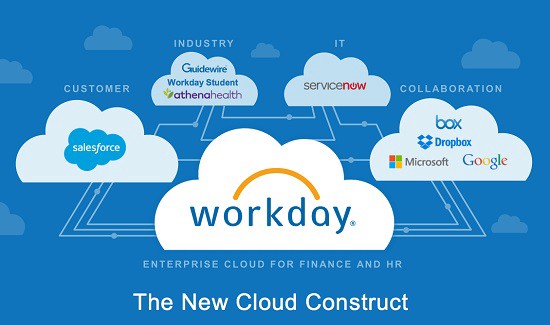
As more and more enterprises move to Cloud Human Capital Management (HCM) solutions, we see an increasing demand for Azure Active Directory (Azure AD) integrations that tap identity at the source where it first gets created.

You’ve told us how enabling such integrations can create transformational ways of managing your workforce. Today, I’m excited to announce that automated inbound user provisioning from Workday to on-premises Active Directory and Azure AD is now Generally Available! Learn more from Workday Training

With pre-built cloud-based integration of Azure AD with the Workday HCM suite, you can now:

  • Securely tap into the rich workforce identity and organization data present in Workday.
  • Implement end-to-end identity lifecycle management covering the entire spectrum of Joiner-Mover-Leaver scenarios using Workday as the “system of record.”
  • Eliminate old school approaches of using flat files or custom scripts to sync employee data.

Since we released the first public preview of this solution, many customers have already successfully adopted and deployed it live in their organizations.

The Azure AD provisioning service now manages 10.8 million identities and we are thrilled to see customers realizing the unique automation and compliance benefits that our cloud managed provisioning service offers. Get more from Workday Online Course

Here is what Mikkel Heiberg, Principal Cloud Architect, at Nilfisk, one of our Danish manufacturing customers, had to say about the solution:

“The Azure AD and Workday integration delivers a solid foundation for automating employee identity life cycle management with direct traceability to Workday HR events. It has accelerated our employee onboarding and off boarding process workflows and eliminated a lot of recurrent tasks for our IT service center.” 

Since the public preview, we added new capabilities to our Workday integration, all based on customer feedback:

  • Lightweight Provisioning Agent wizard to manage on-premises Active Directory domains—The new Provisioning Agent with built-in support for high availability and failover allows you to configure user provisioning to multiple on-premises Active Directory domains.
  • Access to more Workday data—You can now provision data from any attribute supported by the Workday Get_Workers operation of the Workday Human Resources API. This includes cost center data, employee categories, custom user IDs, and more.
  • Automatic unique ID generation and conflict resolution for new users—User Principal Name (UPN) or Common Name (CN) for your new user already exists? No problem! Using the new SelectUniqueValue function, you can now specify fallback logic at the time of user creation for generating non-conflicting values for attributes like CN, samAccountName, and userPrincipalName that have uniqueness constraints.
  • Advanced provisioning of new hires—A common request to IT from business units is to ensure that a newly-hired employee has all their required user accounts pre-provisioned with the correct level of access, in advanced of their first day of work. The Workday provisioning app now enables you to provision user data as soon as it becomes available in Workday, instead of waiting until the user is set to “Active” in Workday.

The Workday-driven inbound user provisioning feature is available today for all customers using Azure AD Premium P1 and above. 

Let us know what you think in the comments below. You can also post your feedback or suggestions for new capabilities that you would like to see in our Azure AD UserVoice feedback forum. Learn more skills from Workday HCM Online Training

And as always, we’d like to say a special thank you to our preview customers and our partners at Workday, who provided great feedback to enhance the integration of Workday HCM with Azure AD and make this feature a reality!

Embracing HR-centric approach to provisioning

The Workday to Azure AD inbound user provisioning solution is designed to work for both hybrid and cloud-first companies looking to automate the provisioning and deprovisioning of users from Workday HCM to on-premises Active Directory and Azure AD.

To get in-depth knowledge, enroll for a live free demo on Workday Online Training

How artificial intelligence and bots are shaping the API economy

Consumer technology moves fast. What’s shiny and new one day can quickly become a relic of the past when the next innovation or iteration comes along. Unfortunately, enterprises don’t have the luxury of simply plugging and unplugging technology into their digital ecosystem the way we as consumers unplugged our Sony Walkmans in favor of iPods and iPhones.

AI chatbot

This is especially true as we look to artificial intelligence (AI). AI has the potential to produce game-changing business outcomes based on data stored in legacy systems—if enterprises can figure out how to make it work. For more info Mulesoft Training

When AI works in an enterprise, it goes beyond generating insights that sit in isolation to actually automating actions based on those insights. For example, one insurance company I spoke with is using AI to discern which of its customers are most likely to renew their premiums, and then automatically contact them by connecting AI to SMS. The firm saw a 60% engagement rate and 30% renewal rate from that text message bot campaign alone. Learn more from Mulesoft Online Training

AI is just a ‘brain in a jar’ without APIs

What many technology leaders don’t realize is that an AI system is only as good as the APIs that support it. For all the excitement around the potential of AI, getting AI to act in a real-world business context remains a challenge. I call this the “brain in a jar” problem.

AI is similar to a brain that is confined in a jar. The human brain is incredibly intelligent — it can process 400 billion bits of information a second. However, without a nervous system attached to automate processes or carry out commands, the brain and all of its insights are rendered more or less useless.

The same is true of AI. Unless AI has a nervous system in place that allows for real-time connectivity across internal and external applications, data sources, and devices, the insights it generates only apply within the context of its jar.

It’s equally imperative for that nervous system to include the organization’s legacy systems of record since it is largely those systems that such AI will depend on for its insights. Without the right connectivity fabric in place to turn those insights into action, its impact is limited to spitting out recommendations that don’t make sense in the real world.  Get more additional skills from Mule 4 Training

APIs are the building blocks for AI

Connecting technology built in different decades is no easy feat. According to MuleSoft’s Connectivity Benchmark Report legacy infrastructure and systems are the most frequently reported challenge to digital transformation, and 59% of IT leaders say their legacy infrastructure makes it hard to introduce new technologies like artificial intelligence, chat APIs, and the internet of things (IoT).

Yet, these emerging technologies are set to disrupt every industry in the same way mobile, SaaS, and the cloud did over the past 10 years. Organizations cannot afford to be left behind.

For organizations to effectively compete in ever-evolving business landscapes, they must outfit both new and legacy systems with APIs that ensure the adaptability of their digital platforms for decades to come.

With these API-based building blocks in place, disparate legacy systems and new-age technologies can easily plug in and out of application networks as fads like AI come and go.

By creating a thoughtful API strategy, organizations can unlock extraordinary value from existing systems while simultaneously leveraging emerging technology like AI—all while remaining secure. 

AI and bots: Get started with a thoughtful API strategy

With more than 21,000 public APIs on the web underpinning the apps we use every day, the new economy these APIs are driving is changing the way companies are built. Thirty-six percent of today’s technology leaders generated more than a quarter of their organizations’ revenue as a direct result of APIs.

Think of McDonald’s delivering food directly to doorsteps via Uber Eats, or HSBC providing a single financial dashboard for customers regardless of where they bank—all possible because of APIs.

To get in-depth knowledge, enroll for a live free demo on the Best Mulesoft Online Training

What does AI Mean in the Context of Workday?

One of the most talked about technologies today is artificial intelligence. Almost every business, in every industry, is discussing how they can take advantage of this emerging technology to transform their capabilities and gain a competitive edge in today’s digitally-driven world.

And Workday is no different; indeed, their name has been thrown into the ring with the term artificial intelligence increasingly over the past few months.

However, when Workday talk of AI they often talk about harnessing the capabilities of machine learning and mathematical algorithms to power predictions and insights.

But Workday isn’t advancing AI-related technology itself, and they aren’t following in the footsteps of other technology companies by building separate products like Einstein, Watson or Coleman. For more info Workday Training

So, this leads us to question: what Workday are actually doing with artificial intelligence.

As David Clarke, SVP Tech and Infrastructure at Workday, put it:

We’re not inventing fundamentally new techniques in machine learning or AI. What we have that’s unique are the data sets that we have access to

So, with over 2,300 customers on standardised data models, Workday clearly intends to pair their customer data with this already prevalent tech, in order to train machine learning and pattern recognition algorithms for specific jobs. 

But what does this look like for their customers?

AI and Analytics within Workday

Workday Prism Analytics is the platform designed to bring together and present Workday and non-Workday data in a self-service tool for users to access insights in real time.

The result? A consolidated view of an entire business’ operations; perhaps a typical business would link external data from a CRM, non—Workday finance and HR data with native Workday project data, for instance.

But, whilst this does provide a complete snapshot, how rich is the insight and how much still depends on human deduction? The answer, unfortunately, is a lot. So, this is where Workday are using their familiar Power of One to its advantage.

Prism itself can offer a snapshot of an entire organisation in one place but layer on machine learning, automation and augmented analytics you find yourself moving away from self-service into AI predictions. This is encapsulated in Workday People Analytics which combines all of the below; Get more skills from Workday HCM Online Training

  • Automated pattern-detection capabilities to look for important changes a human might not see
  • Graph processing to find connections across vast datapoints
  • Machine learning to predict the most important issue for you to see
  • Natural language generation to explain what is happening in a simple story

To put it frankly: the capabilities of Workday Prism are advanced. Indeed, when it comes to the practical application of what might seem like a long list of fancy can-dos, the possibilities are game-changing to organisations.

Take anomaly detection, for instance; whether it’s the cadence of customer payments or monitoring regrettable attrition. It will not only alert individuals, but also draw on multiple data points to offer insight into why this might be changing.

In short it alerts and explains so people can act and not react; something that is crucial in today’s highly competitive and technologically driven markets. 

The example from Workday talks of a people leader who might receive a message showing new hire turnover has increased overall, and that not only should they look at the sales organization in London, but also dig into compensation, as well as a specific hiring manager. Learn more practical skills from Workday Online Course

Having the capability to track data in such a way does offer the insights that businesses will soon rely on but – unfortunately -also brings with it questions on misuse, ethics and regulation…

The Limits of AI

So, how far should a company be allowed to track employee data? Should they, for example, be able to predict whether an employee is looking to make a move outside of the organisation?

This is an entirely plausible scenario, given the fact that feed data points surrounding their LinkedIn activity, age, compensation, seniority and performance are all drawn into People Analytics.

With this combination of data, and the artificial Intelligence technology, businesses can potentially have a powerful insight into predicting their employee behaviour – but there are serious questions over the ethics of doing so.

Indeed, as more businesses bring machine learning, AI and deep learning into their organisation, it is becoming increasingly important for them to take responsibility for the outputs of any system that they choose to deploy, and for any actions that they take on based on the information.

To put it plainly, with the general public increasingly voicing concerns over the rise of artificial intelligence, worrying about biased, fraudulent and malicious applications, it is now the responsibility of the technical providers of these technologies to respond.

In a recent interview with CNBC in Davos for the World Economic Forum Bhusri wisely states that technology is neither good nor bad, it is neutral – what makes it good or bad is how it is applied. Learn more from Workday Integration Online Training

But, he quickly qualifies this with his strong belief that every company that uses data to make decisions, needs to be transparent, where the employee needs to be made aware of what data is used and for what purpose.

As well as other leaders of tech giants – such as the likes of Google, Microsoft and Salesforce – Bhusri suggests that an Ethics Officer will soon be needed in these companies, in order to lay down the rules on policies around privacy and to provide assurance that the technology in question is being used responsibly.

Alongside their skilled team, a Chief Ethics Officer will look at inputs and outputs of AI systems, and ensure that they are aligned with an organisation’s ethical responsibilities.

So, as businesses daily use and reliance on artificial intelligence to power their decisions increases, so too will questions on what accountability they have. Companies can promise to behave ethically and regulate themselves but how will this stand up when financial pressures are applied? Idealism may have to take the hit. Could the only true way to ensure ethical practices be the regulation of AI by independent regulators?

When it comes to Workday, it seems like they’re only on the forefront of their artificial intelligence capabilities; with their current offering already having the potential to transform the way in which organisations can do business.

In a world where a technological advantage can make or break an organisation, businesses will be clamouring for Workday to advance their artificial intelligence capabilities – and we are sure Workday will do so.

But it will be interesting to see how the company continues to respond to increasing pressures from the outside world to ensure their technology is safe, can be regulated and – fundamentally – can be trusted with their data.

To get in-depth knowledge, enroll for a live free demo on Workday Online Training

What is a ServiceNow Instance?

ServiceNow operates using a single tenant architecture meaning that each customer gets their own copy or multiple copies of ServiceNow in the cloud.

These copies are known as ServiceNow instances. Users can access an instance via web browser using each instance’s unique URL such as https://companyname.service-now.com.

Each instance can run multiple applications side by side, so a single instance could potentially host an ITSM, HR, CSM, and Custom Apps all at the same base URL.

This allows ServiceNow to act as a single system of record for multiple business applications, enriching each application through the sharing of data.

For example, the HR application could kick off an Employee Onboarding Workflow which in turn creates a series of Requests in the ITSM application for setting up the new employee’s computer. For more info Servicenow online training

The single tenant architecture also means that each instance is isolated from every other ServiceNow instance. Isolating instances allows organizations to keep their data and processes separate.

Some organizations will use multiple instances to ensure processes with sensitive data are kept separate from more democratized processes.


Using Multiple Instances:

A more common way that organizations use multiple instances is to separate different environments for development purposes, most commonly:

  • Development Instance (companynamedev.service-now.com)
  • Test Instance (companynametest.service-now.com)
  • Production Instance (companyname.service-now.com)

Or as they are more commonly called: dev, test, and prod. Notice in the sample URLs above, the dev and test instances are post-fixed with dev and test (companynamedev and companynametest).

This is most often how you will see the instance URLs represented with the production containing only the company name or instance name. Learn more from Servicenow Certification

Occasionally, you may come across organizations with only two or more than three instances and even encounter other identifiers such as QA, Staging, or Sandbox.

Using multiple instances in this way allows developers to work in non-prod instances and promote development work using a standardized process.

This ensures changes to the instance (like customizing forms or adding new code) can be thoroughly tested before promoting them into the prod environment.

In total, there are 6 ServiceNow instances. Each instance has a unique set of users who are authorized to use the instance, unique groups the users can be assigned to, and unique data stored in the other tables.

It has no impact on test or prod and no impact on the Dixie Rose Delivery Services Instances. Learn practical skills from Servicenow Developer Training

In fact, even if the same usernames exist in each instance, they are not guaranteed to have the same password. The user could (and for security reasons most likely should) set a different password in every instance.

Promoting and Cloning:

As a final note on instances, it is helpful to note that once Dixie Rose Deliveries has evaluated they have multiple options for bringing their dev and production instances back into sync with one another.

First, they could chose to install the ITBM Project Management application in Production and promote up any changes they made in ServiceNow. You may hear this referred to as promoting Update Sets.

Alternatively, they could decide that ITBM is a poor fit for their organization and instead choose to clone the production instance over the dev instance.

This in effect will make dev a carbon copy of prod, making it ready for further development and enhancement.

If you choose to pursue a career in ServiceNow Administration, Implementation, or Development, you will become more familiar with these topics.

Now that we have learned what a ServiceNow instance is, the next step is to get our own ServiceNow instance to explore!

To get in-depth knowledge, enroll for a live free demo on Servicenow Training

Mobile access options with ServiceNow

Access an instance from anywhere using your mobile device. Connect using a mobile web browser or on the native mobile app.

The mobile UI is consistent across most platforms with a few minor differences depending on the browser or the device. Mobile themes and mobile home pages are both configurable by administrators.

Any configuration changes apply to both the native app and the mobile web on a smartphone. The tablet browser interface mimics the standard browser interface, so theme changes do not apply to the tablet browser.

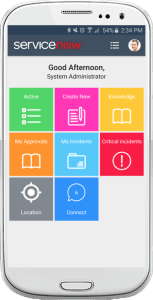
ServiceNow Classic mobile app UI

The classic mobile app is similar for both Android and iOS with a few minor differences to make the experiences unique to each platform.

Any differences between the two platforms are designed to make the app accessible to a user on either device.

For example, the location of the Navigation Menu varies between the two platforms to stay consistent with the platform-specific UI. More skills from Servicenow Admin Training

Not supported

  • Custom app configuration parameters
  • Custom buttons
  • Deep linking to the mobile app
  • Formatters
  • Form Templates
  • Internal distribution
  • Knowledge v2
  • Connect Support
  • UI Scripts
  • UI macro variables in the mobile Service Catalog

Limited support

  • List filtering: Several of the following fields have limited support on mobile devices. You can still create a complex filter in a desktop instance and open it in the mobile app. However, you will not be able to edit any of the limited fields.
    • between
    • dates
    • tags
    • related fields
  • Visualizations are specific to a device. If you set up a visualization in the app on your iPhone, then view the app on an iPad, the visualization may not be the same.

Mobile UI

Access an instance using a mobile browser or the native mobile app on an iOS, Android, or tablet device.

The mobile web UI is similar to the native mobile app. Some features are optimized more for the native app and may not perform as well on a mobile browser.

Administrators can configure home pages by role so different users may see different mobile experiences depending on their role.

Mobile web unsupported features

  • Switching to the standard browser interface from the mobile interface
  • HTML fields
  • CODE tags to render HTML in Journal Fields
  • UI Scripts
  • Connect Support
  • Legacy Chat
  • Field styles
  • Formatters
  • Form Templates
  • Timeline visualizations
  • Embedded lists
  • Assessments, surveys, and legacy surveys
  • Mobile service catalog features
    • Order guides
    • Wizards
    • Content items
  • These variable types:
    • Macro With Label
    • UI Page
    • List Collector
    • HTML
    • Macro
    • Label
    • Break
  • Data lookup rules
  • Custom auto-complete scripts

Tablet UI

Use a tablet to access your instance either from a browser or from the native app.

Use the native tablet app for an experience similar to the native mobile app. Applications or modules that you have favorited in a desktop instance appear as tiles on your mobile app homescreen.

Connect to an instance using the browser on your tablet for an experience similar to the standard desktop user interface. For more info Servicenow Certification

Tablet features with limited support

  • Editing lists: You cannot edit field values in a record from the list view. Access the record form to modify any field values.
  • Dependency Views map, schema map, graphical workflow editor, Gantt chart, and visual dispatch tool: Graphics-based tools can be viewed but not modified from the tablet interface. Data presented by these tools is read-only when accessed through the tablet interface.
  • Calendars: You can access calendar reports but scrolling around the calendar as you would on the desktop interface is not supported.
  • Homepage bookmarks: UI11 bookmarks are not supported in the tablet UI. You can use favorites to mark modules in the application navigator for quick access when using the tablet UI.
  • Video and image attachment upload: Attach videos and images with both iOS 9 and Android. Other file type attachments are not allowed.

Unsupported tablet features

  • Field watcher: Administrators must use the desktop version to access the Field Watcher.
  • JavaScript debugger: Administrators must use the desktop version to access the JavaScript debug window.
  • Language picker: Even if the internationalization plugin is enabled, the language picker does not appear in the tablet UI toolbar. Language selected through the desktop interface applies to the tablet UI.
  • Domain picker: Tablet users cannot select any other domains that administrators configure for domain-specific personalizations. To select a new domain, use the desktop interface.
  • Slushbucket feature: Any lists, fields, or filters that use the slushbucket feature are unsupported on a tablet device. Slushbuckets are only supported in the desktop interface.
  • Suffix in the navigation filter: You can use the .list, .do, or .form shortcuts to access a list of records in a table or a new form from the desktop version only.
  • Support chat: End users cannot request a chat session nor can support technicians respond to chat requests when using the tablet interface. Help desk chat is only supported in the desktop interface.
  • Printer friendly view: This view, which shows the current screen in a pop-up window without frames and the application navigator, is not available from the tablet.
  • Timeline sliders and the Timeline Metrics UI actions: Features that use timelines, such as the workflow timeline and the Gantt chart are not supported from the tablet.

Dublin mobile web UI:

Use the classic Dublin mobile web UI for a classic ServiceNow mobile experience.

The new mobile web UI is automatically enabled when you upgrade to the Istanbul release. Administrators can revert to the classic Dublin mobile web experience, by setting the glide.ui.m.helsinki_mobile_enabled property in the sys_properties table to false.

To get in-depth knowledge, enroll for a live free demo on Servicenow Training

Reasons your company should use ServiceNow

ServiceNow has been the forefront of Platform-as-a-Service (PaaS) solutions for the past few years and has been growing exponentially each year. It has a proven capability to transform IT and the enterprise, now becoming a career strategy for leading CIOs.

With all of the benefits that ServiceNow offers, it’s no wonder it’s so popular. Not sure if it’s right for you? Read this post to learn the 5 reasons on why your company should use ServiceNow. For more additional info Servicenow Certification

ServiceNow is Simple

ServiceNow has been changing the way people work since 2003 and repeatedly lists as one of the fastest growing software companies of all time.

As the enterprise cloud company, ServiceNow provides a service model that defines, structures and automates the flow of work, removing email and spreadsheets from the process to streamline the delivery of services.

It replaces those manual transactions with a consumerized “light-speed” service experience designed for everyone in the enterprise.

While ServiceNow solves many business problems, one of the biggest benefits of ServiceNow is the relatively low amount of configuration required to get up and running in an enterprise. It means that you can immediately be productive and begin identifying concerns and resolve them. Learn more skills from Servicenow Online Training

ServiceNow’s NOW Platform is Fast

Built to manage everything as a service, ServiceNow helps the modern enterprise operate faster and be more scalable than ever before. It does this by placing a service-oriented lens on the activities, tasks and processes that make up the day-to-day work life.

The reason it is so efficient is that it gives you a solid platform, including architecture, straight out of the box. From there you can work on the rules and build the forms very quickly, and you don’t even have to worry about what structures your databases are.

Not only does it have about 75% of your work done for you as soon as you set it up, it also has a very open architecture so you can take it and plug it into different systems or processes that are otherwise not represented. 

ServiceNow’s NOW Platform is Powerful

ServiceNow is many things. Not only is it flexible, but it is exceedingly powerful in every aspect of its design.

ServiceNow enables enterprise service domains to define services, provide an intuitive service experience, deliver service, assure service availability and analyze critical service metrics. Here are just a few of the tools available to you in ServiceNow: 

  • Application Development: Quickly build, test and publish applications that can span from a single department to your entire enterprise. As little to no coding is required, almost anyone can build business applications for every line of business.
  • Field Service Management: ServiceNow makes field service management simple by replacing spreadsheets, email and other management tools with a single system.
  • Finance Service Management: Efficiently fulfill submitted requests including financial reports, procurement and payroll issues; gain visibility into work requests and trends over time.
  • HR Service Management: Create a system of engagement that works in tandem with existing applications for core HR, talent and workforce management.
  • IT Service Management: ITSM consolidates and automates service management processes, increase efficiency, lower costs—and devote more time to creating the consumer‑like self‑service experience that users expect.
  • Security Operations: ServiceNow Governance, Risk, and Compliance module systematically manage security incidents, prioritize vulnerabilities, visualize the effectiveness of security investments, and adapt to changing conditions.

To get in-depth knowledge, enroll for a live free demo on Servicenow Developer Training

ITIL Interview Questions and Answers

What is ITIL?

Information Technology Infrastructure Library (ITIL) is a collection of comprehensive practices for IT Service Management (ITSM), which focuses on IT services alignment with the requirements of business needs.

It helps businesses to achieve their mission with the best way to plan, manage, and deliver.

Explain the benefits of ITIL.

The major benefits of ITIL are listed below:

  • Powerful alignment between the business and IT
  • Improves customer satisfaction and service delivery
  • Improved utilization of resources by lowering costs
  • Comprehensive visibility of IT costs and assets
  • Better administration of business risk and service disruption
  • Supports constant business change for a stable service environment

What is ‘change request’ in ITIL?

A change request is a formal proposal for an alteration to some product or system.

What is a ‘service request’?

A service request is a user request for information or advice, or for a standard change or for access to an IT service. For more info Servicenow Training

What are the ITIL processes according to V3 edition?

The processes are – service strategy, service design, service transition, service operation, and continual service improvement (CSI).

Who decides the categorization of a proposed change within an ITIL compliant Change Management process?

This is the task of the Change Manager. A Change Manager will plays a key role in ensuring that the projects (change initiatives) meet their objectives within timelines and said budgets by increasing employee adoption and usage.

What are the 7 R’s of change management?

The Seven R’s of Change Management are:

  • Who RAISED the Change?
  • What is the REASON for the change?
  • What RETURN will the change deliver?
  • What RISKS are there is we do or do not carry out the change?
  • What RESOURCES will be required to perform this change?
  • Who is RESPONSIBLE for this change being performed?
  • What RELATIONSHIPS are there between this and other changes?
What’s the Difference Between a Change Request and a Service Request?

A change request is a formal proposal to alter a particular product or system, while a service request is formally submitted by a user, and is a request for IT service access, the changing of a standard, or information or advice.

Service requests include things like access to the cloud or requiring a new laptop or printer. Learn more from Servicenow Certification

As a rule, service requests deal with things that have already been approved of by company policy and don’t require any extra permission.

What is the PDSA Cycle, and What Are the Phases?

The PDSA stands for Plan-Do-Check-Act, and is a systematic series of steps for gaining valuable learning and knowledge for the continual improvement of a product or process. It is also known as the Deming Wheel, or Deming Cycle. The phase breakdown consists of:

  • Plan: Identify and analyze the problem
  • Do: Develop and test a solution to the problem
  • Check: Measure how effective the developed solution handles the problem, analyze possible ways the solution could be improved
  • Act: Full implementation of the perfected solution

Which two service management processes will most likely use risk analysis and management methodology?

The two service management processes are Availability Management and IT Service Continuity Management.

ITIL Availability Management aims at defining, analyzing, planning, measuring, and improving all aspects of the availability of IT services. Availability Management is responsible for ensuring that all IT infrastructure, processes, tools, roles, etc. are appropriate for the agreed availability targets.

IT Service Continuity Management (ITSCM) aims at managing risks that could seriously impact IT services.

ITSCM ensures that the IT service provider can always provide the minimum agreed service levels, by reducing the risk from disaster events to an acceptable level and planning for the recovery of IT services.

ITSCM should be designed to support Business Continuity Management.

Explain a Known Error.

A Known Error refers to an identified problem that has an acknowledged root cause and a solution. It consists of the following:

  • Status
  • Error Description
  • Root Cause
  • Workaround

What Type Of Information Would You Store In The Service Catalogue?

The Service Catalogue contains a list of services that an organization provides, often to its employees or customers. For each service within the catalogue, we typically include description, time-frames or SLA for fulfilling the service, owners (who is entitled to request/view the service), costs and how to fulfill the service.

To get in-depth knowledge, enroll for a live free demo on Servicenow Online Training

ServiceNow newyork performance analytics and reporting

Analytics, Intelligence, and Reporting:

Optimize processes and increase productivity with Performance Analytics, virtual agents, and machine learning. The Analytics, Intelligence, and Reporting products help provide many different kinds of data to many different kinds of users. Listen to the Story of the Four Stakeholders, which describes the kinds of data different people in your organization might want to see. For more Servicenow Training

Get the insights you need:

The Analytics, Intelligence, and Reporting products can help you to lower costs and increase productivity through process improvement, self-service, and automation. Service owners can deliver and refine AI capabilities quickly, gaining greater insight into real-time patterns and trends for service delivery teams.

This information enables you to make better, faster decisions—without the need for data science expertise.

Highlight of Analytics, Intelligence, and Reporting features:

Make smarter decisions with embedded intelligent analytics

Use Performance Analytics to establish a foundation of metrics and visualizations to drive greater visibility, alignment, and continuous improvement across your business.

Identify and rank records of interest based on multiple weighted criteria

Use Spotlight to define weighted criteria to identify and rank records that require attention, such as when triaging incidents or performing lead scoring.

Quickly take action through self-service

Virtual Agent is a chatbot that simulates the conversations or messaging interactions a human agent would typically have with a user. With a virtual agent in place, customers, partners and employees making requests and inquiries receive automated responses from a bot instead of from a person. Learn more from ServiceNow Online Training

Enable the system to learn and respond to human-expressed intent

Natural Language Understanding enables the Virtual Agent chatbot to understand the intent of what people are looking for and provide them with more relevant answers

Improve the interactions between processes and human service agents

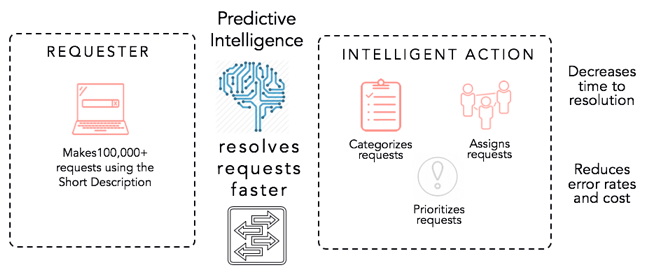
Use Predictive Intelligence in combination with Virtual Agent to deflect tickets, reduce call volumes, and automate common requests to deliver great service experiences.

Performance Analytics:

Performance Analytics enables businesses to set, track, and analyze progress against goals. The products helps you improve performance and accelerate continual service improvement by:

  • Tracking critical process metrics and trends.
  • Measuring process health and behavior against organizational targets.
  • Identifying process patterns and potential bottlenecks before they occur.
  • Continually visualizing the health of processes through both historical and real-time statistics in role-based dashboards enabling individual stakeholders to make informed decisions.

Spotlight:

Spotlight illuminates records that otherwise you might overlook due to evaluating only one aspect of given records. You can define weighted criteria to identify and rank records that require attention, such as when triaging incidents or performing lead scoring. Learn Practical Skills from Servicenow Developer Training

You can rank records based on multiple dimensions, instead of by a single field value such as priority. While most organizations address high-priority items in a timely manner, lower priority items sometimes are not addressed for an extended period of time. Spotlight helps you focus on items based on business need.

Virtual Agent:

Implementing a virtual agent to handle common requests and tasks enables your users to get immediate help, day or night. Providing your virtual agent on channels familiar to your users, such as third-party messaging apps, to offer a convenient way for them to contact you. A virtual agent can also offer personalized customer experiences by applying and remembering user information during the conversation.

Natural Language Understanding:

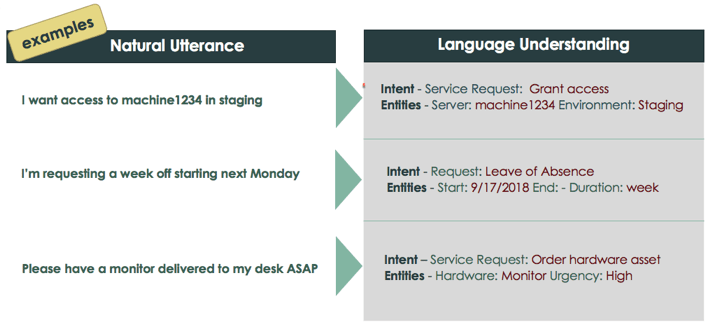
Natural Language Understanding (NLU) provides an NLU model builder and an NLU inference service that enable the system to learn and respond to human-expressed intent. By entering natural language examples into the system, you help it evaluate word meanings and contexts so it can infer user or system actions.

Predictive Intelligence:

Predictive Intelligence uses machine learning to shorten triage and categorization time, contributing to higher customer satisfaction. Pinpoint issues and deliver actionable insights to get service owners and agents to faster resolutions.

To get in-depth knowledge, enroll for a live free demo on Servicenow Developer Training

Create your own website, free on WordPress.com.Create your own website.
Start free