ServiceNow Admin Interview Questions and Answers

  1. What is update set?

An update set is a group of customization that can be moved from one instance to another.

2. Where do you modify Service catalog item?

Service catalog>Maintain Item

3. What does the application navigator?

Provides links to all application menus and modules. For more info Servicenow Training

4. Where tables can be manipulated?

Record List Forms Table and Columns

5. Filter are defined with following attributes in ServiceNow?

Field name, operator and Values

6. What is full form of CMDB and what is it?

CMDB is the abbreviation for Configuration Management Database which is repository that acts as data center for IT installation. It holds that data that is relevant to the set of IT assets and vivid relationships between such assets.

7. What are LDAP Integration and explain its use?

LDAP stands for Lightweight Directory Access Protocol are used for user data population and user authentication. ServiceNow associate with LDAP directory to automate the creation of user and to streamline the user log in the process.

8. Define CMDB Baseline?

CMDB Baseline is used to understand and control the changes made to a configuration Item (CI). These Baselines act as a snapshot of a CI. Learn more Servicenow Admin Training

9. What is Service Catalogue in ServiceNow?    

Service catalogs are used by the software developers for providing their customers the ability to make requests. Catalogs can be used to make portals for the users to make requests for certain catalog items.

It enables the companies to fulfill their customer’s requirements that will result in more satisfaction in terms of self-service. The service catalog API allows the companies to improve their efficiency, reduce the costs, and make faster delivery of products.

10. What are workflow activities?

Approvals conditions Notifications Task Timer Utilities

11. What runs on Client side and Server side?

UI policy and Client scripts run on Client side Business rules and Data policy runs on a Server side.

12. How do you set read only field?

UI policy

13. What is a business rule?

A piece of java script configured to run when record is displayed, inserted, deleted or queried.

14. What is coalesce?

Coalesce is feature of a field that is used in transform map field mapping and enables you to use the field as a unique key. If a match is using the coalesce field and get detected, the existing record will be updated with the information being imported. If a match is not found, then a new record will be inserted into the database.

15. What are UI policies?

UI policies are substitute to client scripts that change information on a form and regulate custom process flows for tasks. UI policies are used to set important fields which can only be read and visible on a form. It can be also used for dynamically changing a field on a form.

16. What is a data policy?

Data policies are somehow similar to UI policies which are used to enforce data consistency by establishing essential and read only states for fields. It can apply rules to all the data that are entered into the system, including data brought in through email, import sets or web services and data entered through the mobile UI.

17. What is ServiceNow Ticketing tool?

The ServiceNow ticketing tool is a tool that works in 3 steps to resolve the user issues quickly.

The steps are:

  1. Issue reporting – The problem or issue is reported by using the service catalog or the service portal at the home page of ServiceNow, via an email or by creating a ServiceNow incident.
  2. Issue management – The problems are managed by assessment, assignment, and handling.
  3. Resolution of the issue – The issue is resolved after providing the required information by the team by filling up a form.

18. How to create an incident in ServiceNow?

The steps to create an incident in ServiceNow are provided below:

  • Go to the Incident and then click on Create New.
  • Based on the type of incident, use a template. Templates prepared by the company can also be used.
  • Fill up the form describing all the incident information. This will include information like the user name, affected business service, the affected item, urgency of the incident, description and related information.
  • Hit on the Submit button.

To get in-depth knowledge, enroll for a live free demo on Servicenow Online Training
List features and actions in Servicenow

A list displays a set of records from a table.

Users can search, sort, filter, and edit data in lists. Lists may be embedded in forms and may be hierarchical (have sublists).

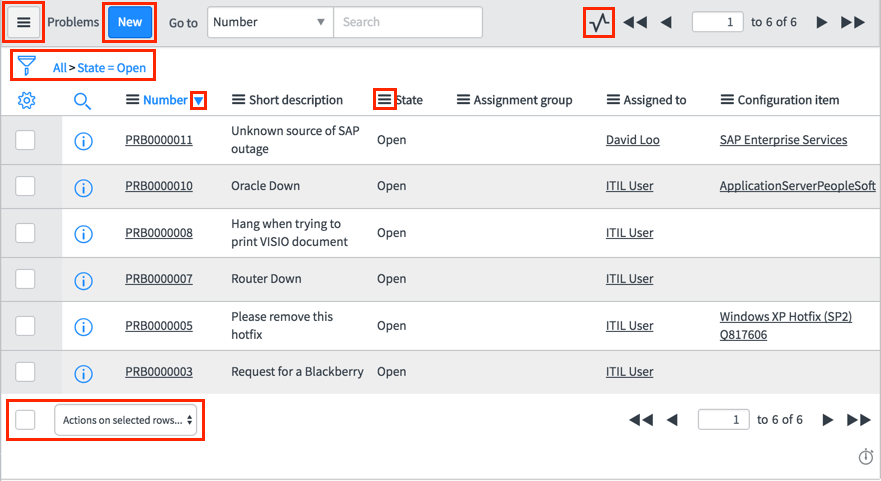
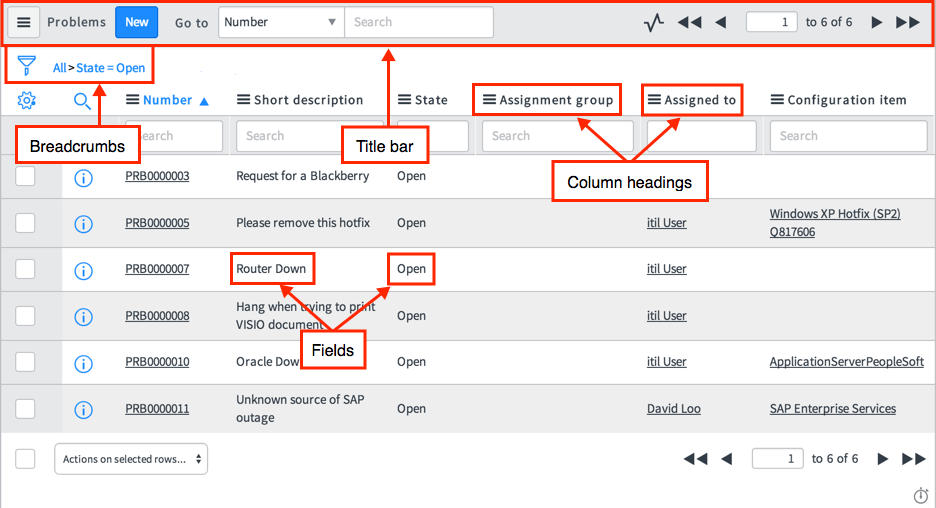
The list interface consists of a title bar, filters and breadcrumbs, columns of data, and a footer. Each column in a list corresponds to a field on the table.

Watch the twelve-minute video User Interface | Getting Started with Lists for an in-depth introduction to list functionality. For more info Servicenow Admin Training

A response time indicator (Response time indicator) may appear at the bottom right of some lists to indicate the processing time required to display the list.

There are two versions of lists available. Companies with large or complex datasets, or those accustomed to the features in List v2 should avoid activating the list v3 plugin.

Record list

List features and actions

The list interface consists of a title bar, filters and breadcrumbs, and columns of data. Each of these components provides features and lets you act on the list and the displayed records. There are two list versions: List v2 and List v3.List v2 view features, menus, and actions. For more additional info Servicenow Online Training

Hierarchical lists:

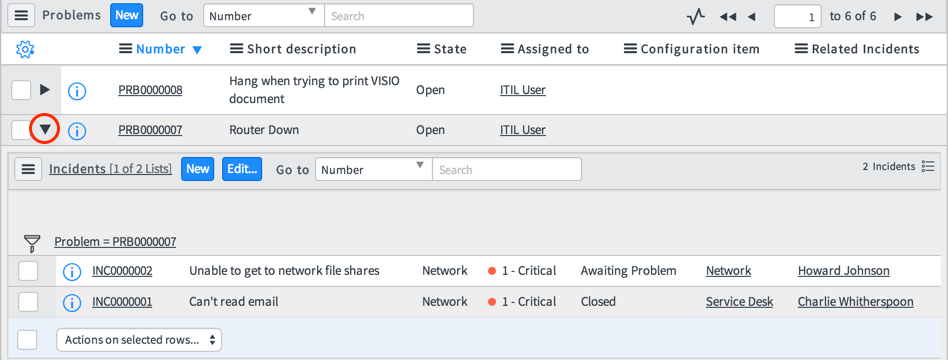
Hierarchical lists allow users to view records from related lists directly from a v2 list without navigating to a form.

Note: Hierarchical lists are not supported in List v3. Tables that have hierarchical lists enabled always display in List v2.

Lists can have sublists in a hierarchy that can also be accessed in list view. To expand or collapse the related lists on a record in a hierarchical list, click the arrow (Arrow) beside the reference icon. Learn practical skills from Servicenow Training

Hierarchical list:

Detail rows

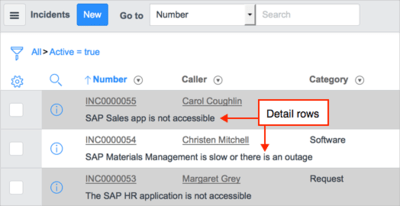
Detail rows, when enabled, appear below the field row for each record and display the value of a specified field. For example, the detail row might display the short description for each incident in a list. Detail rows support the same functionality as fields, including links, editing capabilities, and access to the context menu.

Note: When a field is designated as the source for the list detail rows, the system hides the list column for that field.

Detail rows:

Administrators can enable detail rows and add them to v2 lists (UI15 or later required).

  • List fields:

Fields display data and provide certain functions.

  • Configure and use list functions:

All users can interact with lists for the tables their role permits them to access. Some list and column header menu options are controlled by permissions grated to the user role.

  • Activity streams in list view:

Stream live activity information for all records on the current list.

  • Search a list:

You can search a list to find information quickly. The list title bar includes options for searching the list. Administrators can enable text searches for any list.

  • Grouped lists:

Grouping aggregates a list by a field and displays the record count per group. Grouping can help you find data quickly by organizing and providing a summary of search or filter results.

  • Filters and breadcrumbs:

A filter is a set of conditions applied to a table to help you find and work with a subset of the data in that table.

  • Methods for list edits:

Users can edit data in lists using various methods.

  • Personal lists:

Users can create personal lists to customize which columns appear and the order in which they appear. Personal lists modify a specific list view according to individual preferences.

  • Comparison of List v2 and List v3

There are several differences between List v2 and List v3. List v3 is no longer available for new deployments. If you are already using list v3, you may continue to do so.

  • List v3 split mode:

In List v3, split mode lets users view a list and form side by side, in a split pane layout.

To get in-depth knowledge, enroll for a live free demo on Servicenow Certification

New York Delta exams and micro exams on the NOW Learning platform

It’s that time of the year again where certified ServiceNow professionals need to do their delta exams.  I took a gamble this time and did the delta exams without much New York specific experience or study. 

At work, we have not yet upgraded to New York, and I also missed this year’s New York launch broadcast videos. For more Servicenow Online Training

Knowing that delta exams are open book with 10 or fewer questions plus a free retake, I took the plunge on Sep 19th, the first day that they are made available.  

Prep Work

Before taking the delta exams, I took a micro certification exam on the NOW learning platform to get familiar with the new system.  This step was quite helpfulas the new system works much differently from Webassessor. 

It’s so much easier to start an exam without knowing, and you can easily lose your chance of passing if you are not ready.  In fact, I accidentally started a micro certification exam while I was trying it out just now.

On the day of the exam, I had my browser tabs open to docs.servicenow.com (zooming in on the New York release notes section), my personal developer instance, and New York release facts sheet article on community. 

I did two deltas in a row, delta for Certified System Administrator, then delta for Servicenow Certification Application Developer.  

So here are my tips for you to pass the deltas with flying colors.

Steps to Take a Delta or Micro Exam

  1. Book yourself at least half an hour per delta exam away from any distractions. (1 hour for a micro exam).
  2. Login to the new NOW learning platform https://nowlearning.service-now.com
  3. Find the certification exam that you would like to take.  There are a lot of items to browse through.  Not sure what’s the fastest way to find your exam, but one way is to go to “My Certifications” or use the global search function with the keyword “delta” and some filtering options.
  4. Once you found your certification to take, click on the “Enroll” button.
  5. Now take a deep breath and make sure you are all set to go.  Keep an eye on the clock.  Note that there is no timer counting down for you on the new system. 
  6. Click on the “Next” button if you are on the “1.0 Certification” page or click the “2.0 Assessment” link from the left of the page will start the exam right away without any warning.
  7. Now you will be on a page with a list of multiple-choice questions and a “Submit” button at the end of the page.  You won’t be able to mark a question for review.  So make a mental note of which questions you need to get back to.
  8. After you hit “Submit”, you will see a pop up of your assessment result.

Aftermath

Congratulations if you have passed the exam!  Now, repeat the same process for all your deltas.  I received an email notification that my certification is maintained, and a day later I got an email saying that the same certification is once again at risk. 

Even logging into the NOW learning portal 10+ days later, I’m greeted with a big orange warning message which I’m assuming is a false alarm as I am fairly certain I passed the exams. I’ve also got certified but have “INACTIVE” displayed in one of my micro certifications.

As a ServiceNow developer, I find the System Administrator delta exam a bit more difficult than the Application Developer exam.  Perhaps it is broader in scope and answers to the questions require some digging. 

The delta exams forced me to learn new features in New York.  If you are quick at researching and have good reading comprehension, I believe you can pass the exams too.  

Being someone who likes to try out new things, I would say that this experience was a bit interesting, stressful, fun, and almost felt like I was beta testing a new product at my own risk. 

It also reinforces my thoughts on the importance of a good UX design.  Fortunately, only ServiceNow certifications are at risk and not hundreds of lives like the Boeing Max 737 accident. 

But to be fair, perhaps many ServiceNow professionals require their certifications to be up-to-date and losing their certifications would mean having to retake the full proctored exams at $150 each.

As true with any new system, it’s clear that the NOW learning system still has some issues to iron out. 

Out of curiosity, if you are a certified ServiceNow professional, please make your mark via a comment or like below.  I would be interested in knowing how many people are impacted by the new test system.

To get in-depth knowledge, enroll for a live free demo on Servicenow Developer Training

Servicenow Career Scope and Future Growth

ServiceNow is growing very fast across different industry and  since its inception and after 14yrs also the demand is huge in the market.Even from startups to enterprises servicenow is in high demand.

young business person and graphical user interface concept. Artificial Intelligence. Internet of Things. Information Communication Technology. Smart City. digital transformation.

Servicenow India office has many openings and also it partner ecosystem like Accenture,Cognizant also has openings in servicenow developer Training or servicenow administrator. Servicenow has more than 2000 customers globally.

No doubt there is high demand in future also for servicenow professionals.So many training institutes are upskilling the existing IT talent in different modules of servicenow.

Even the salaries for servicenow in India and globally are pretty good.We at HunterTech are the servicenow implementation partners and ITSM consulting firm.

we always be looking for certified servicenow developers or experienced servicenow professionals.

You can learn more about what is servicenow developer here and how it will help your career grow.Here is the answer we found in servicenow community user replied about future career with servicenow jobs.

“As per my knowledge right now ServiceNow Market is good, each and every release they are concentrating on new modules say for example in Helsinki ServicePortal, Performance analytics, ITSM setup Guide. For more info Servicenow Training

 Future of Servicenow :

The future with ServiceNow can be known as a security profile for new job applicants. ServiceNow is implemented in many organizations from varied areas.

The execution of ServiceNow has created jobs for IT professionals in a variety of companies. ServiceNow is an ever-growing platform and in the near future has no less for job creations.

Career in Servicenow :

ServiceNow is implemented by companies from almost all the fields that provide service and support like the automobile industry, IT industry, medication, insurance, media and enjoyment etc.

Few IT companies have fought with an obsolete ITSM system in the past. They felt that this would attract them back in the global industry in terms of service quality. This future insecurity forced IT companies to outsource their management and maintenance issues.

It leads to customer dissatisfaction resulting over expenditure and ended up being time-consuming. With ServiceNow, the IT companies are able to work with all the departments on a single platform which helps you to save both time and money.

Career growth and future of Servicenow:

The future with ServiceNow can be known as a security profile for new job applicants. ServiceNow is implemented in many organizations from varied areas.

The execution of ServiceNow has created jobs for IT professionals in a variety of companies. ServiceNow is an ever-growing platform and in the near future has no less for job creations.

Applications of Servicenow:

  • IT Service Desk
  • Resolving Security Threats
  • HR Service Delivery
  • Customer Service
  • Business Applications
  • Personal Developer Instances (PDI)

Companies using Servicenow Technology:

  • APA Group
  • TCF Financial Corp
  • Adidas
  • accenture
  • AEGIS
  • AMP
  • Allianz
  • Bank of Ireland
  • Virtusa
  • IBM
  • Capgemini
  • HCL
  • Mindtree etc.

Salaries in Servicenow career / year:

  • Senior Software engineer – 2,062,944
  • Software engineer – 1,463,678
  • Associate applications Developer – 1,077,353
  • Senior Application developer – 1,976,229
  • Software development engineer – 1,570,776
  • Associate software Engineer – 1,218,000 – 1,491,000

How and Where to learn Servicenow:

in order to start your career in Servicenow then learn Servicenow from scratch which helps you a lot.

After learning basics then try to learn other ITSM Tools also which is very helpful.

To get in-depth knowledge, enroll for a live free demo on ServiceNow Online Training

Introduce Yourself (Example Post)

This is an example post, originally published as part of Blogging University. Enroll in one of our ten programs, and start your blog right.

You’re going to publish a post today. Don’t worry about how your blog looks. Don’t worry if you haven’t given it a name yet, or you’re feeling overwhelmed. Just click the “New Post” button, and tell us why you’re here.

Why do this?

  • Because it gives new readers context. What are you about? Why should they read your blog?
  • Because it will help you focus you own ideas about your blog and what you’d like to do with it.

The post can be short or long, a personal intro to your life or a bloggy mission statement, a manifesto for the future or a simple outline of your the types of things you hope to publish.

To help you get started, here are a few questions:

  • Why are you blogging publicly, rather than keeping a personal journal?
  • What topics do you think you’ll write about?
  • Who would you love to connect with via your blog?
  • If you blog successfully throughout the next year, what would you hope to have accomplished?

You’re not locked into any of this; one of the wonderful things about blogs is how they constantly evolve as we learn, grow, and interact with one another — but it’s good to know where and why you started, and articulating your goals may just give you a few other post ideas.

Can’t think how to get started? Just write the first thing that pops into your head. Anne Lamott, author of a book on writing we love, says that you need to give yourself permission to write a “crappy first draft”. Anne makes a great point — just start writing, and worry about editing it later.

When you’re ready to publish, give your post three to five tags that describe your blog’s focus — writing, photography, fiction, parenting, food, cars, movies, sports, whatever. These tags will help others who care about your topics find you in the Reader. Make sure one of the tags is “zerotohero,” so other new bloggers can find you, too.

Design a site like this with WordPress.com
Get started